How we reviewed this: this is a research-based review. We did not buy or test the product ourselves. We checked the official website, policies and independent customer feedback, and every fact below links to its source. Facts checked 2026-11-04. How we review · Affiliate disclosure: we may earn a commission if you buy through our links, at no extra cost to you.
The best smart lock for you depends on one question: are you allowed to replace your deadbolt? Renters need a retrofit that keeps the old key; homeowners can swap in a keypad or fingerprint deadbolt. We didn’t test these ourselves. We read lab and hands-on results from Consumer Reports, CNET, PCWorld, PCMag and Tom’s Guide, then checked each maker’s page for price and specs on November 4, 2026.
Quick answer
Replacing the deadbolt: the Yale Assure Lock 2 with Wi-Fi ($259.99), Consumer Reports’ top Wi-Fi lock. Renting: the August Wi-Fi Smart Lock ($199.99), a retrofit that keeps your key. Tight budget: the Yale Approach ($139.99). Cheapest retrofit with a fingerprint keypad: the SwitchBot Lock Ultra Touch Combo ($209.99).
Top picks
Homeowners (replace the deadbolt)
- Best overall: Yale Assure Lock 2 with Wi-Fi ($259.99). Consumer Reports’ top Wi-Fi lock; CNET’s best overall.
- Best invisible and Matter lock: Level Lock Pro ($349). PCWorld’s best overall.
- Best for iPhone users: Schlage Encode Plus. Consumer Reports’ Apple Home Key pick; BHMA AAA per Schlage.
- Most ways in: SwitchBot Lock Vision Pro ($229.99). Face, palm and fingerprint, Matter built in.
Renters and apartments (keep your deadbolt and key)
- Best retrofit: August Wi-Fi Smart Lock ($199.99). CNET’s and PCMag’s best retrofit.
- Best budget retrofit: Yale Approach Lock with Wi-Fi ($139.99). Tom’s Guide’s budget and renter pick.
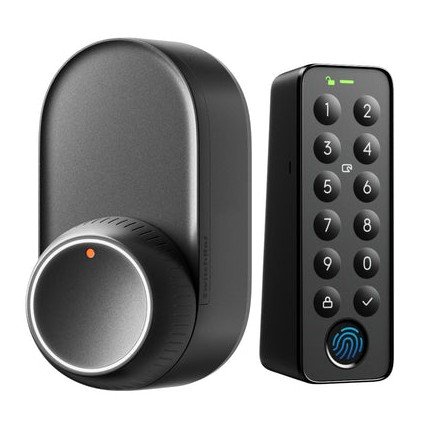
- Best value with fingerprint: SwitchBot Lock Ultra Touch Combo ($209.99 with hub and fingerprint keypad).
See the SwitchBot Lock Ultra Touch Combo →
Comparison: price, type, connectivity and battery
| Smart lock | Type | Price (Nov 4, 2026) | Unlock methods | Smart home and hub | ANSI/BHMA grade | Battery |
|---|---|---|---|---|---|---|
| Yale Assure Lock 2 Keypad with Wi-Fi | Replaces deadbolt | $259.99 | Keypad, app, key | Wi-Fi module included (CR); Alexa, Google, Apple Home | Grade 2 (Yale) | 4 AA |
| August Wi-Fi Smart Lock | Retrofit (inside only) | $199.99 | App, auto-unlock, key; keypad extra | Built-in Wi-Fi, no bridge; no full Matter yet (CNET) | Not stated (CNET lists Grade 3) | 2 CR123, 3 to 6 months (August) |
| Yale Approach Lock with Wi-Fi | Retrofit (inside only) | $139.99 | App, auto-unlock, key; keypad extra | Yale Connect for remote control (Yale) | Not stated | 4 AA |
| Level Lock Pro | Replaces deadbolt | $349 | Touch, app, key card or fob, Apple Home Key, key; keypad extra | Matter over Thread hub or $79 Level Connect | ANSI Grade 1, BHMA AAA (Level) | 1 CR2, 9 to 12 months (Level) |
| Level Bolt | Retrofit (bolt only) | $199 | App, key; keypad extra | Matter over Thread hub or Level Connect | Not stated | 1 CR2 |
| Schlage Encode Plus | Replaces deadbolt | Not listed by Schlage | Keypad, app, Apple Home Key | Wi-Fi (CR); Matter certified, works with Thread | BHMA AAA (Schlage) | Not stated |
| SwitchBot Lock Ultra | Retrofit (inside only) | $139.99 ($209.99 with hub and fingerprint keypad) | App, auto-unlock, voice, watch, NFC; fingerprint with keypad | Bluetooth; hub needed for Wi-Fi and Matter | None (retrofit, per PCWorld) | Rechargeable 4,200mAh, 12 months (SwitchBot) |
| SwitchBot Lock Vision Pro | Replaces deadbolt | $229.99 | Face, palm vein, fingerprint, keypad, NFC card, app, key | Built-in Wi-Fi, Matter over Wi-Fi, no hub | Not stated | Rechargeable 10,000mAh + CR123A backup, 12 months (SwitchBot) |
Maker prices on November 4, 2026, before coupons. Battery figures are the makers’ unless a tester is named.
Best overall: Yale Assure Lock 2 with Wi-Fi
This is the lock the lab and the hands-on testers agree on. Consumer Reports named the Wi-Fi version its Best WiFi Smart Lock, writing that it held up “against kick-ins and attacks from a cordless drill” and is “very easy to set up.” CNET made the Assure Lock 2 its best overall, calling it “compact, sturdy” with “an excellent app.” Yale sells the Keypad with Wi-Fi version for $259.99 and rates it ANSI/BHMA Grade 2; it runs on 4 AA batteries.
- Pros: strong kick-in and drill results; Wi-Fi module and DoorSense sensor included (worth $90, per Consumer Reports); Alexa, Google Home and Apple Home; 2-year electronics warranty.
- Cons: CNET says “Can be pricey” and not every version has fingerprint access; full deadbolt swap, so not for most renters. Watch the model: Consumer Reports gave the Assure Lock 2 Plus “a poor score in our drilling tests.”
See the Yale Assure Lock 2 (we don’t earn a commission from Yale) →
Best retrofit for renters: August Wi-Fi Smart Lock
If your lease says hands off the deadbolt, this is the testers’ favorite: it replaces only the inside thumb-turn. CNET and PCMag both name it their best retrofit, and PCMag gave it an Editors’ Choice, calling it “easy to install” and “a top renter-friendly option.” Consumer Reports gave it “high scores for remote access, remote monitoring, and ease of setup.” August sells it for $199.99 with built-in Wi-Fi, so it “requires no additional bridge.”
- Pros: the most tester wins of any retrofit here; Wi-Fi built in; auto-lock, auto-unlock and DoorSense; works with Alexa, Google Assistant and Siri.
- Cons: CNET calls it “still bulky” with “No full Matter compatibility yet”; August expects 3 to 6 months per set of CR123 batteries (CNET says up to 3); fingerprint keypad bundle $249.99.
See the August Wi-Fi Smart Lock (we don’t earn a commission from August) →
Best budget retrofit: Yale Approach Lock with Wi-Fi
Tom’s Guide names the Approach its best budget smart lock and its pick for renters, because you can “retrofit it alongside your existing deadbolt and keep your current keys.” Consumer Reports also calls it “another highly rated retrofit smart lock.” Yale sells it for $139.99, says it fits “most single cylinder deadbolts,” and runs it on 4 AA batteries with a 2-year electronics warranty.
- Pros: $139.99 from a major lock maker; auto-unlock when your phone gets close (Tom’s Guide); auto-lock with DoorSense; Alexa, Google and SmartThings.
- Cons: Tom’s Guide says remote unlocking needs a plug-in Wi-Fi bridge, and Yale’s page says remote control works when “Paired with a Yale Connect”; keypads cost extra ($179.99 with Keypad, $239.99 with fingerprint Keypad Touch).
See the Yale Approach (we don’t earn a commission from Yale) →
Best invisible and Matter lock: Level Lock Pro (and Level Bolt)
Level fits its electronics inside the door’s bore and latch holes (per Consumer Reports), so from the street it looks like an ordinary deadbolt. PCWorld calls the Lock Pro “our highest-rated smart lock,” Consumer Reports made it a Matter pick after it did “well in our kick-in tests and decently in our lock picking and drilling tests,” and CNET named it best invisible lock. Level sells it for $349 and says it is ANSI Grade 1 and BHMA AAA certified (CNET’s spec box lists Grade 3, so the sources disagree).
Renters: the $199 Level Bolt replaces only the bolt inside your door and keeps your existing hardware and keys. PCWorld picks it as best retrofit, “the champion of unobtrusive retrofit smart locks.”
- Pros: nobody can tell it’s smart; Matter over Thread works with Apple Home, Google Home, Alexa and SmartThings; Apple Home Key; two RFID key tags included (PCWorld).
- Cons: no keypad or fingerprint built in; PCMag warns “you need a Thread border router for remote control,” or a $79 Level Connect bridge; most expensive pick.
See the Level Lock Pro (we don’t earn a commission from Level) →
Best for iPhone users: Schlage Encode Plus
If you want to tap your iPhone or Apple Watch to unlock, similar to Apple Pay, Consumer Reports picks the Encode Plus for Apple Home Key. It “performs well in our brute-force tests for kick-ins and drilling, but it’s somewhat susceptible to lock-picking.” Schlage calls it a BHMA “AAA Certified Deadbolt,” Matter certified and Thread compatible, with a 3-year electronics warranty. Schlage lists no price.
- Pros: Apple Home Key tap and hands-free unlock; strong kick-in and drill results; built-in alarm.
- Cons: Consumer Reports says it’s “not the easiest lock to set up”; somewhat pickable in its tests; no fingerprint reader; check retailer prices yourself.
See the Schlage Encode Plus (we don’t earn a commission from Schlage) →
Best value retrofit with fingerprint: SwitchBot Lock Ultra
The Lock Ultra ($139.99) replaces your inside thumb-turn like the August. Its real case is price: the Touch Combo adds a Hub Mini Matter and a fingerprint Keypad Touch for $209.99, about $40 less than August’s $249.99 fingerprint bundle (August needs no hub, since its Wi-Fi is built in). PCWorld wrote that it “fixes nearly all the problems we encountered with SwitchBot’s previous smart lock,” and its roundup calls it “simple to install, affordable, and reliable.”
The cautions are real. Gizmodo found app unlocks took “anywhere from one to 10 seconds,” Apple Home control through Matter “often failed,” and concluded: “I wouldn’t put the Lock Ultra on my front door.” A Matter Alpha reviewer found his Lock Ultra “had fallen off and was lying on the floor.” SwitchBot locks also had a Bluetooth flaw, CVE-2026-8374, that let a nearby attacker turn a keypad “lock” command into an unlock. Per Neodyme, which found it, SwitchBot shipped final fixed firmware in April 2026. Update the Lock Ultra to V2.8, the Keypad Touch to V2.9 and the app to V9.18 or later.
- Pros: cheapest fingerprint retrofit bundle we priced; rechargeable battery rated 12 months; Matter through the hub.
- Cons: Bluetooth only without a hub; PCWorld says the Level Bolt is smaller and more attractive; patched security flaw; 1-year warranty. More in our SwitchBot review.
See the SwitchBot Lock Ultra →
Most ways to unlock: SwitchBot Lock Vision Pro
For homeowners who want biometrics, the Vision Pro ($229.99) replaces the whole deadbolt and adds 3D face, palm vein and fingerprint readers, a keypad, NFC cards and a backup key. Unlike SwitchBot’s retrofit locks, it has Wi-Fi and Matter built in, no hub needed. Android Authority called it “a great product for users looking for an affordable smart lock,” found palm unlock worked “even in the dark,” but said face scanning “struggles to operate in low-light conditions” and the “Plastic body doesn’t feel incredibly robust.” Matter Alpha called it “one of the best Matter-compatible smart locks you can buy” yet “already dated,” with no Aliro or ultra wideband support.
- Pros: three biometrics for $229.99; rechargeable pack plus a CR123A backup rated for 500 emergency unlocks (Android Authority) and USB-C emergency power.
- Cons: no lab security test and no ANSI/BHMA grade stated; Matter Alpha found face unlock “not fast enough for me to rely on” and got one unit with oversized screws; Matter only locks and unlocks.
See the SwitchBot Lock Vision Pro →
Also considered
- Eufy Smart Lock Touch and Wi-Fi S230: Consumer Reports’ fingerprint pick with strong kick-in and picking scores. Eufy’s US page showed no price on November 4.
- Ultraloq: CNET’s budget pick and PCMag’s best overall, but Ultraloq’s page mixes models, so we couldn’t confirm a price and specs.
- Wyze Smart Lock: cheap, but CNET says Wyze “has had a string of security issues.”
How to choose a smart lock
Renter or owner: retrofit vs full deadbolt
A retrofit lock (August, Yale Approach, Level Bolt, SwitchBot Lock Ultra) replaces only the inside part, so the outside looks the same and your key works. Tom’s Guide recommends retrofits for renters and says to check your lease first. A full replacement (Yale Assure Lock 2, Level Lock Pro, Schlage, SwitchBot Lock Vision Pro) swaps the whole deadbolt.
Matter, Thread and hubs
Matter lets one lock work with Apple Home, Google Home, Alexa and SmartThings. Matter over Thread, which Level uses, needs a Thread border router such as an Apple TV 4K or HomePod mini (Level). Bluetooth-only locks work from your phone nearby; for remote control you need built-in Wi-Fi (August, Vision Pro) or a bridge (SwitchBot hub, Level Connect, Yale Connect).
Keypads, fingerprints and faces
Keypads let guests in without a phone; retrofits need a separate keypad mounted outside. Face unlock is the fussiest: Gizmodo (Keypad Vision), Matter Alpha and Android Authority (Lock Vision Pro) all reported distance or low-light trouble, so keep a PIN or fingerprint as backup.
Security grades
CNET explains that ANSI/BHMA Grade 1 is strongest, most smart locks are Grade 2, and Grade 3 is best avoided on exterior doors. PCWorld notes a retrofit carries no ANSI or BHMA rating. Consumer Reports found drill resistance varies even between sibling models, and found both Kwikset picks very or highly susceptible to a drill. We found no CPSC recalls for any brand here.
What happens when the batteries die
Many locks warn you when power runs low (Tom’s Guide). Keyed models and retrofits that keep your old key (August, Yale, Level, SwitchBot Lock Ultra) let you use the key. The Vision Pro has a backup battery and a USB-C port for a power bank. CNET says batteries draining in a couple of weeks means something is wrong.
CNET also advises strong passwords and two-factor authentication on the app account; see our best password manager guide.
FAQ
What is the best smart lock?
For most homeowners, the Yale Assure Lock 2 with Wi-Fi ($259.99). It is Consumer Reports’ top Wi-Fi lock and CNET’s best overall. Renters should look at a retrofit such as the August Wi-Fi Smart Lock ($199.99).
What is the best smart lock for an apartment?
A retrofit lock that keeps your deadbolt and key. CNET and PCMag pick the August Wi-Fi Smart Lock, Tom’s Guide picks the Yale Approach ($139.99), and the SwitchBot Lock Ultra Touch Combo adds a fingerprint keypad and hub for $209.99. Check your lease first.
What is the best keyless door lock?
For keypad entry, the Yale Assure Lock 2 with Wi-Fi. For iPhone tap to unlock, the Schlage Encode Plus with Apple Home Key. For fingerprint, face and palm, the SwitchBot Lock Vision Pro, though no lab has tested its strength.
Are smart locks safe?
Strong ones are. Consumer Reports found the Yale Assure Lock 2 held up to kick-ins and drilling. Flaws do happen: SwitchBot patched CVE-2026-8374, a Bluetooth bug. Keep firmware updated and use a strong app password.
Do smart locks work if the Wi-Fi or battery dies?
Yes, usually. Keyed locks open with the key, and many warn you when batteries run low. The SwitchBot Lock Vision Pro has a backup battery and a USB-C port for a power bank.
Do I need a hub for a smart lock?
Not always. The August Wi-Fi and SwitchBot Lock Vision Pro have Wi-Fi built in. The SwitchBot Lock Ultra needs a SwitchBot hub for remote control, and Level locks need a Thread border router or Level Connect.
Sources
- Consumer Reports: 10 best smart locks of 2026 (updated Aug 19, 2026)
- CNET: best smart locks of 2026 (updated Oct 7, 2026)
- PCWorld: best smart locks 2026
- PCMag: the best smart locks (updated Nov 3, 2026)
- Tom’s Guide: the best smart locks
- PCWorld: SwitchBot Lock Ultra review (May 2025)
- Gizmodo: SwitchBot Lock Ultra review (Feb 2026)
- Matter Alpha: SwitchBot Lock Vision Pro review
- Android Authority: SwitchBot Lock Vision Pro review (June 2026)
- NVD: CVE-2026-8374
- Neodyme advisory: CVE-2026-8374
- CPSC recalls search: SwitchBot
- Yale Assure Lock 2 Keypad with Wi-Fi (official)
- Yale Approach Lock with Wi-Fi (official)
- August Wi-Fi Smart Lock (official)
- Level Lock Pro (official)
- Level Bolt (official)
- Schlage Encode Plus (official)
- SwitchBot Lock Ultra (official)
- SwitchBot Lock Ultra Touch Combo (official)
- SwitchBot Lock Vision Pro (official)